


Laptops were designed for travel, but were they designed to keep you comfortable while you work? “Nope,” is the big response from a study from 2020 (see the end for paper link!). They found that using an external keyboard, rather than the built-in one, is the best way to go. What problems did the laptop present, though?
Laptop problems?
The researchers understand that laptops offer us advantages of portable and lightweight computing power on-the-go. However, laptop usage has been found to increase risks of “musculoskeletal complaints, specifically discomfort and pain in the neck, shoulder, and back regions.” The idea behind the paper is to put a fine point on what can be done to prevent and manage the drawbacks of laptop use.
Screen too low? Your neck says, “I can just bend forward.”
Keyboard too high? Your shoulder says, “I can adjust to this, no biggie.”
And while your neck and your shoulders can adapt to these inconveniences, it’s not a great way to do things in the long-term.
“Placing the laptop on a higher workstation surface may spontaneously adjust the screen height, but this can increase an awkward posture risk in shoulder, forearm and wrist as the keyboard placement does, then, not follow the recommended ergonomic guidelines.”
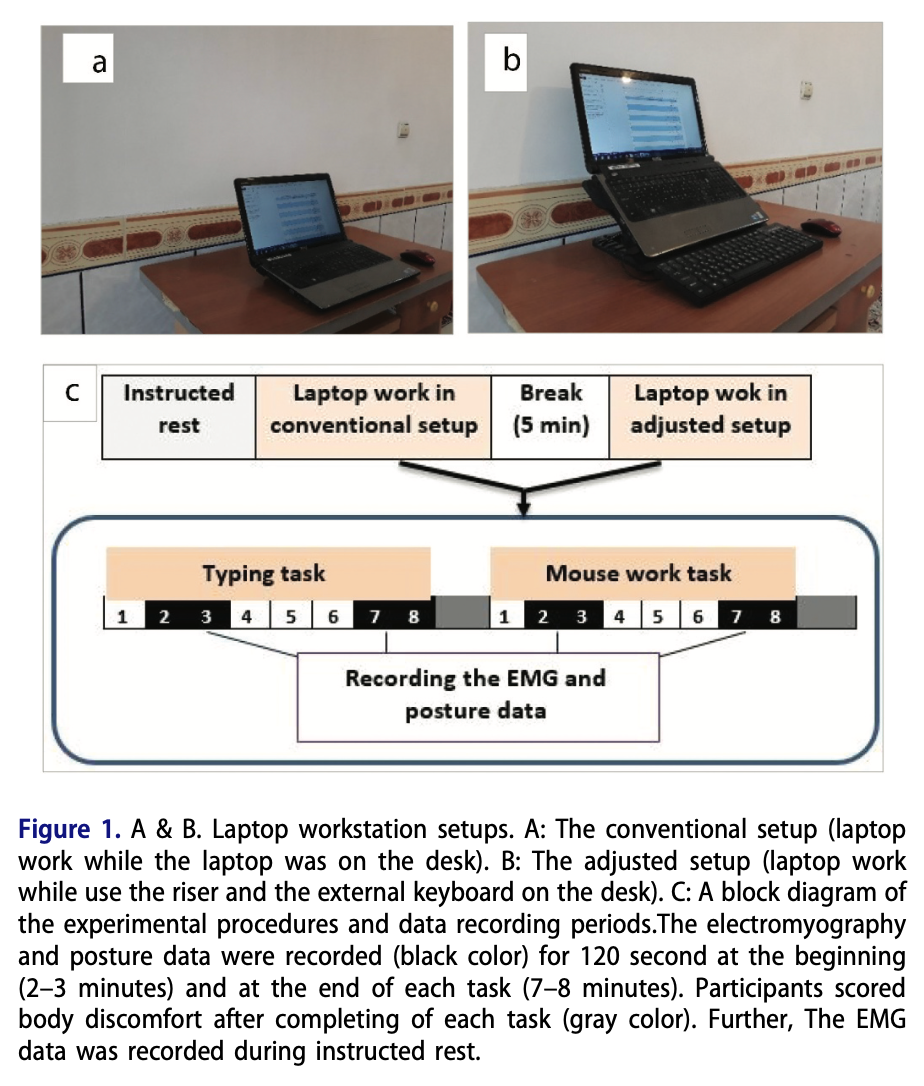
In addition to the shoulder, forearm and wrist awkwardness, more activity in the muscles is found when the shoulder is adjusting to these new angles. The researchers wanted to observe the muscle activation/discomfort from a conventional setup as compared to an external keyboard setup, what they call ‘adjusted setup’. Conventional setup is just like it reads on the tin: it’s your laptop sitting on your desk. The adjusted setup being the screen of the laptop raised to eye level and the use of an external keyboard and mouse used.
Testing, Testing, Testing
For 20 healthy young men, the researchers measured the activity in the muscles: cervical and lumbar erector spinae, multifidus, upper trapezius and anterior deltoid. Basically, your upper and lower back, neck, and muscles on the front of your shoulders.
While the researchers did the measuring, the participants did their own personal scoring for neck, back, and general discomfort.
External Keyboard for the Win!
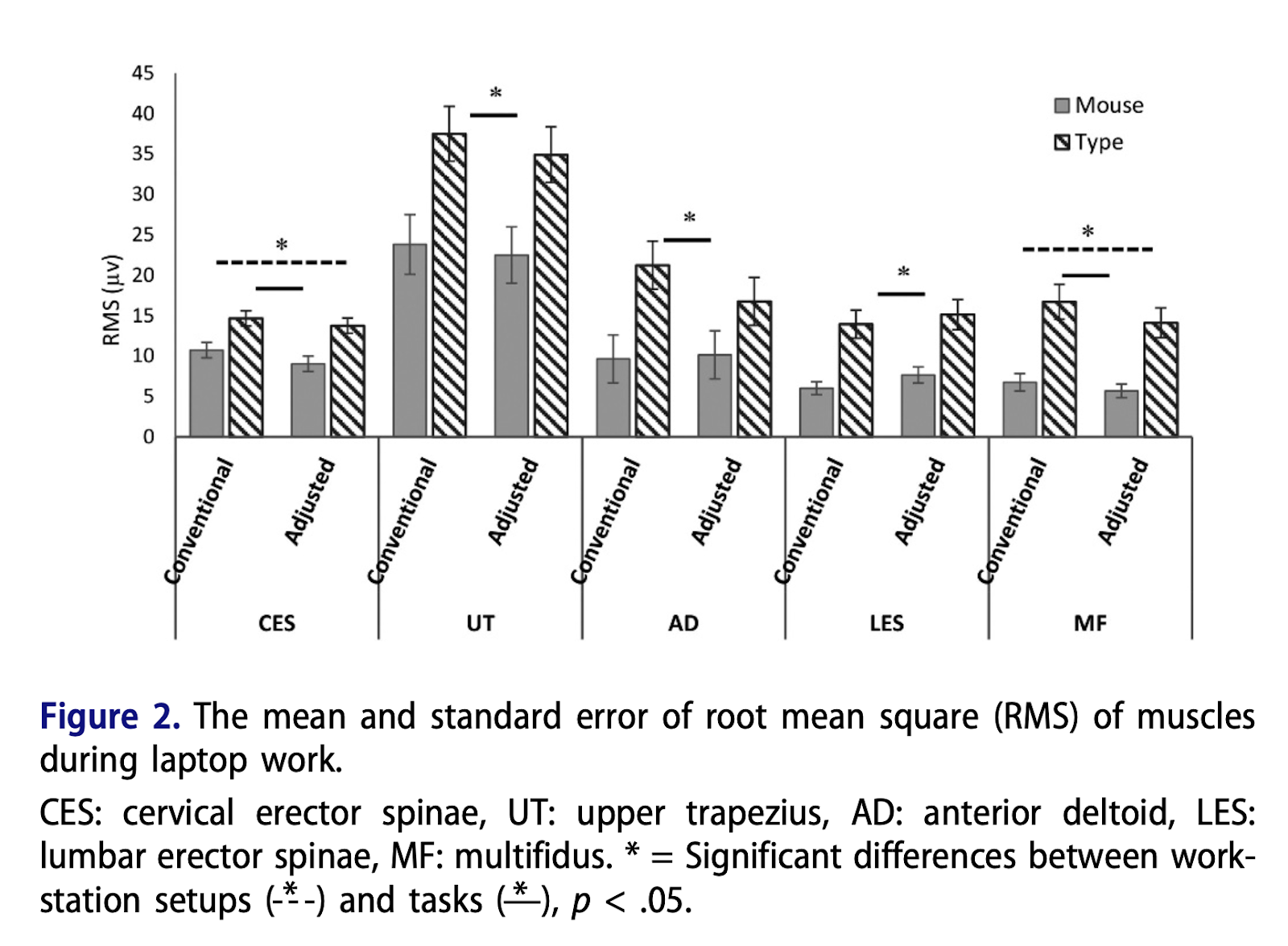
With the adjusted setup, an external keyboard combined with a raised screen reduces strain on neck flexion, upper back flexion, neck muscle activity and deep spine muscle activity. (Mayyybe I should reconsider how much laptop leisure time I do on my couch…)
In other words, your neck is doing less bending and is working less hard. You already do enough hard work, don’t make your body do more!
Across the board the muscle activation for typing is significantly higher than for mouse usage. All muscles work harder to use a keyboard than a mouse across both the setups used in the study.
Typing is the most physically demanding thing you do at your desk! Seems to line up with why an external keyboard could be a big assist in helping your muscles.
On top of this, an external keyboard seems to significantly drop shoulder muscle (specifically, anterior deltoid, front shoulder muscle) activity. It dropped ~21% during typing with the adjusted setup.
But those were the objective results from the researcher folks. What did the participants think of all this?
“...84% of the participants reported that the adjusted setup was generally more comfortable, and they preferred this setup for work with laptops. Also, some 67% of them reported that it was specifically less discomforting for their neck and back.”
While this is great information to have, it would be a delight to see follow-up studies that featured more populations outside of healthy young men, as recommendations for more body-supportive laptop work is relevant to a wide range of people. Especially given that many of us spending a lot of time on our laptops aren’t college students anymore!
Active Steps You Can Take
I jumped over this detail before, but it is worthy of note: this paper also recorded of how much time muscles get to relax in a term they used from ‘00 and ‘93 studies, “Relative Rest Time,” (RRT). Low RRT has been deemed a risk factor for developing work-related musculoskeletal disorders. Getting your posture right is one thing, but it’s good to keep front of mind if your muscles are getting a rest as well.
Taking breaks is critical. Similar to the whole 30-30-30 rule for eye strain, taking a break every 30 minutes to look for 30 seconds at something 30 feet away (or 9.144 meters for our friends without eagle measurements). Having built-in breaks can be as important as putting your muscles in a better place by using an external keyboard.
You don’t even have to go wild with something in a format that looks like learning a whole new language (though that’s fun and you should totally try that!); you can take a look at the Quefrency LM, which has the vibes of a laptop keyboard but with an elevated feel and that split flair you know us for.
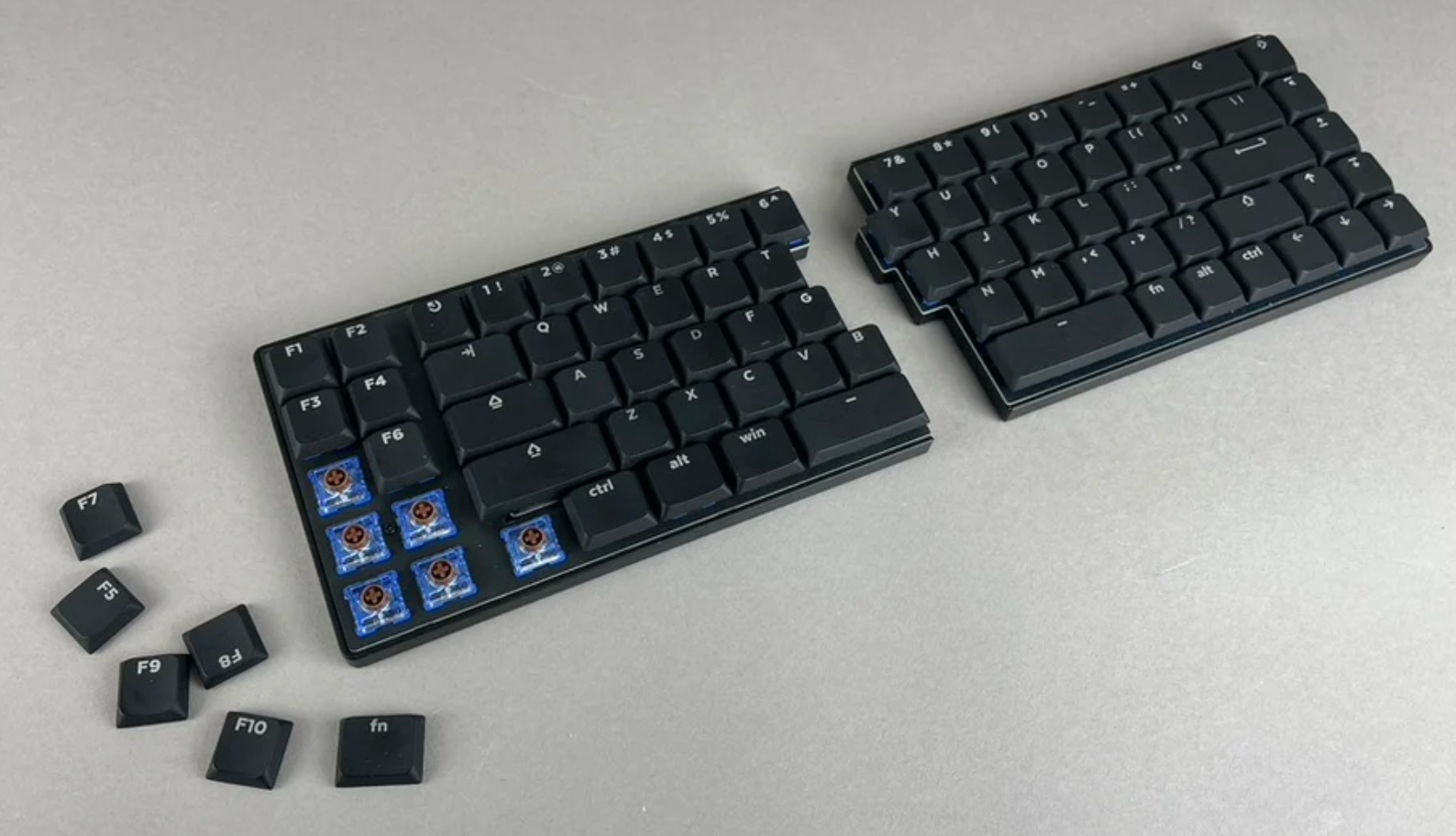
This board released just this March! Give it a look!
Citation:
Check out the paper, The Effect of Adjusting Screen Height and Keyboard Placement on Neck and Back Discomfort, Posture, and Muscle Activities During Laptop Work, 2020.
Member discussion