


What if the fastest mouse isn't the most wrist-friendly? A group of Cornell researchers set out to compare five different mouse designs—not just by how quickly people could use them, but by what their wrists were doing while they used them.
Twenty-four people completed point-and-click and dragging tasks with five different optical mice while a sensor attached to their hand and forearm measured their wrist posture.
And the results were a little more complicated than "ergonomic mouse = better."
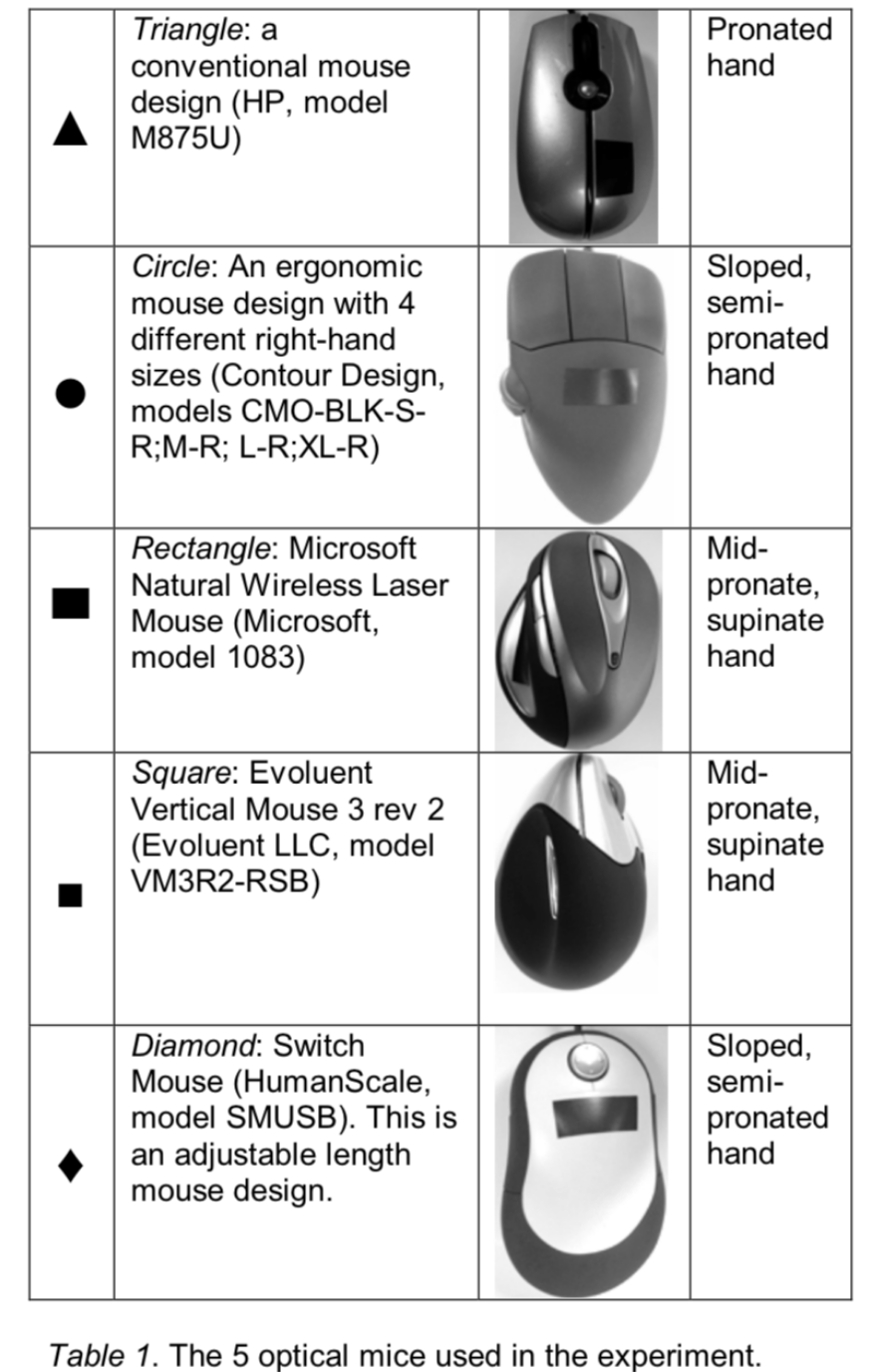
The five mice ranged from a conventional mouse to two sloped designs and two vertical designs.
Just like with keyboards, the interesting question isn't only which design is ergonomic? It's also how does that design interact with the person using it?
Let’s see what the researchers found.
5 Mice, 2 Tasks
With the five different optical mice, the researchers measured two things:
One, how quickly people completed common mouse tasks and
Two, what their wrist was actually doing while they used each mouse.
The participants completed two very realistic tasks:
- point-and-click - Think of selecting folders, opening files, clicking browser tabs
- and dragging - Think of grabbing something, moving it, and releasing it. Moving windows, dragging layers, rearranging icons.
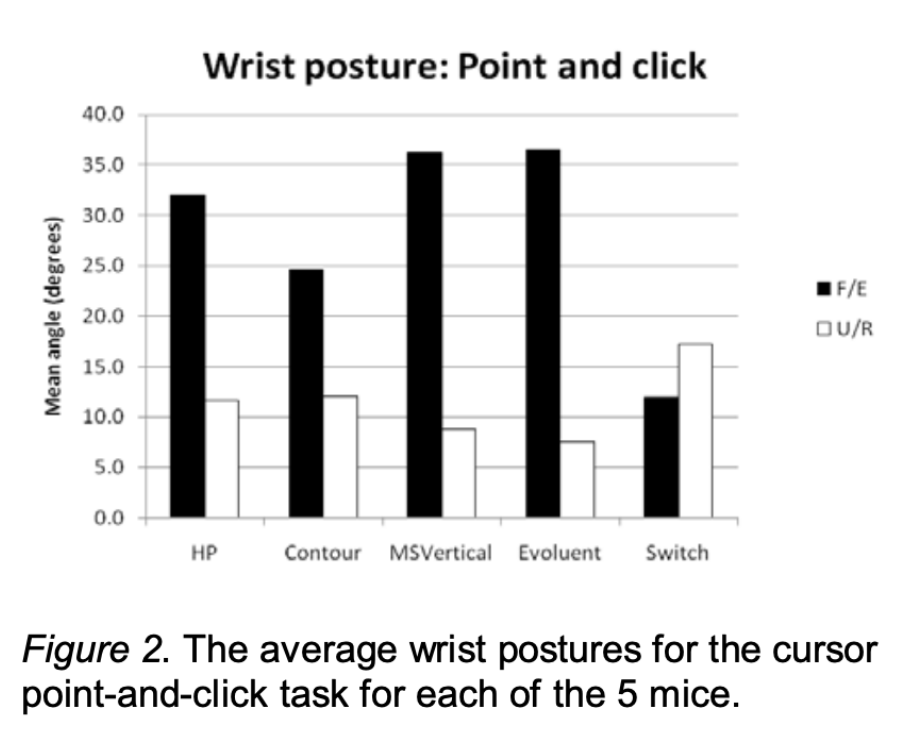
The vertical mice were found to be the fastest. Not by a huge amount. But consistently. The traditional mouse was generally the slowest. The vertical mice completed point-and-click and dragging tasks faster than the others.
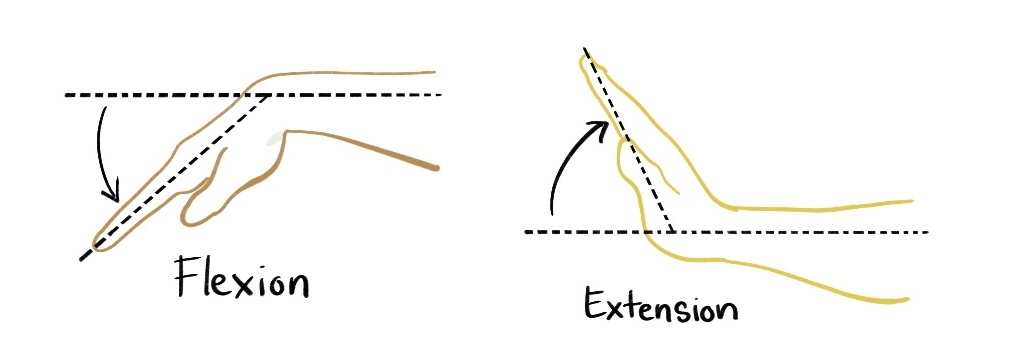
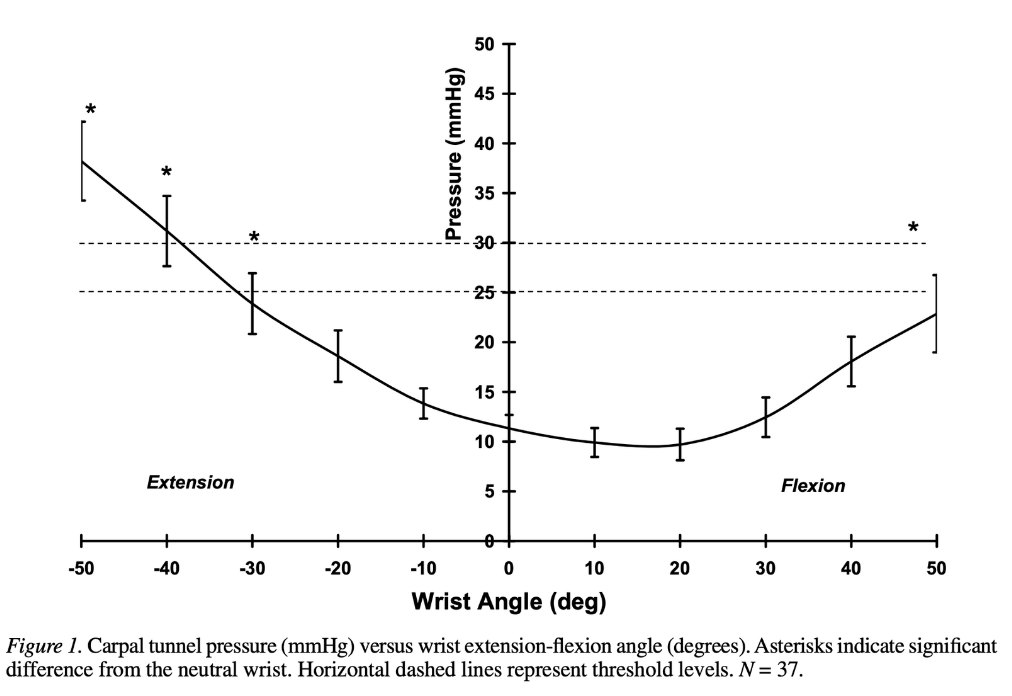
Plot twist: while the vertical mice were the fastest… They also produced the greatest wrist extension. Previous research cited by the authors has raised concerns about wrist extension during input-device use, including its effects on the carpal tunnel.
And I know you’re thinking: hey, wait a minute… Aren’t those supposed to be the best?
Vertical mice are designed to put the hand in a more mid-pronated/supinated position.
That's a big part of what makes them appealing as an ergonomic alternative.
But here's the catch: changing one part of your posture doesn't automatically make every other joint angle more neutral.
In this study, the vertical designs were associated with more wrist extension than the other designs.
Big Takeaways?
Perhaps the biggest thing that the researchers make note of is that performance and posture were affected in opposite ways.
In other words: better speed didn’t necessarily mean better wrist posture.
They concluded that an adjustable slanted mouse may provide the best balance between speed and neutral wrist posture.
So was there a design that managed to balance the two better than the others? The researchers thought so. The Switch Mouse was an adjustable-length, slanted design, and it produced the lowest wrist extension of the five mice.
Why?
Because it produced the lowest wrist extension. The researchers repeatedly note that it kept wrist extension lower than the other designs during both pointing and dragging tasks.
Having something adjustable is already really important to the mechanical keyboard community. We already believe that one keyboard size doesn’t fit everyone, one tenting angle doesn’t fit everyone and one thumb key position doesn’t suit everyone. So this is fairly consistent with the rest of ergonomic assertions in the keyboard community.
Limitations
Limitations are not necessarily flaws in a study, but they let us know how far the information can be applied, which is very important for this context.
This study:
- Only had 24 participants
- Only included healthy adults (people without Carpal Tunnel Syndrome, RSI, or other hand/wrist conditions)
- Only included right handed participants
- Looked at short, standardized laboratory tasks rather than weeks or months of everyday use
Most of us aren't spending our workdays clicking standardized targets in a laboratory, so there's still plenty we don't know about how these postures play out during everyday computer use.
What design asks your body to do
With ergonomics, we're often looking for the right answer: the right keyboard, the right tenting angle, the right switch, the right mouse.
But this study is a good reminder that ergonomic design is often less about finding a perfect solution and more about understanding the trade-offs.
A vertical mouse may improve one aspect of your hand position while making another less neutral. A lighter switch may require less force while making accidental presses easier. A more aggressive thumb cluster may reduce finger travel while asking your hand to adapt to a new position.
There isn't a universally perfect mouse—or keyboard—only designs that shift different ergonomic trade-offs.
And maybe that's the more useful question to ask: not "Is this ergonomic?" but "What is this design asking my body to do?"
Citations
The main paper discussed: Ergonomic Comparison of Slanted and Vertical Computer Mouse Designs from the Proceedings of the Human Factors and Ergonomics Society Annual Meeting, 2010
Mentioned paper: Guidelines for Wrist Posture Based on Carpal Tunnel Pressure Thresholds from the Journal of Human Factors, 2007
...and the blog post written about those guidelines: https://blog.keeb.io/carpal-tunnel-syndrome-inevitable-or-preventable/


Member discussion