


What would happen if you took a bunch of ergonomic keyboard research, made a checklist of all the things researchers thought could help our hands and arms, and then designed a keyboard around that checklist?
Well, in 2020, a group of researchers did pretty much exactly that.
They called their proposed keyboard Trinity, and it makes for a surprisingly fun comparison with the keyboards we have on our desks today.
Standard keyboards
Standard keyboards do the unibody (non-split) routine.
This means our bodies are in positions associated with discomfort and injury:
- Palms face down (forearm pronation)
- Wrists bent, instead of straight (ulnar deviation)
![Figure 1 from the study. “An aerial view of a women’s [sic] hand using a conventional laptop keyboard requiring wrist ulnar deviation and forearm pronation [25].”](https://storage.ghost.io/c/aa/02/aa02f8d3-418e-41b8-a983-81c666768eb7/content/images/2026/10/image.png)
The paper argues alternative keyboard designs can address some of those postural factors that may cause injuries like RSI, CTS, and others.
What makes this study different?
It’s part literature review, part design proposal. This isn't just a study asking, “Is an ergonomic keyboard more comfortable?”
The authors went a step further. They reviewed existing research on keyboard design—things like split angles, slope, tenting, key spacing, palm support, comfort, and typing performance—and then used those findings to propose a keyboard of their own.
The paper explicitly says it is reviewing previous keyboard interventions while also introducing a user-centric ergonomic design based on those interventions.
If you want to poke your nose into the paper, that's laid out at the end of Section 1.2/beginning of Section 2. Just be aware some of the vocab they’re using to describe things is a little different from what the mechanical keyboard community generally uses.
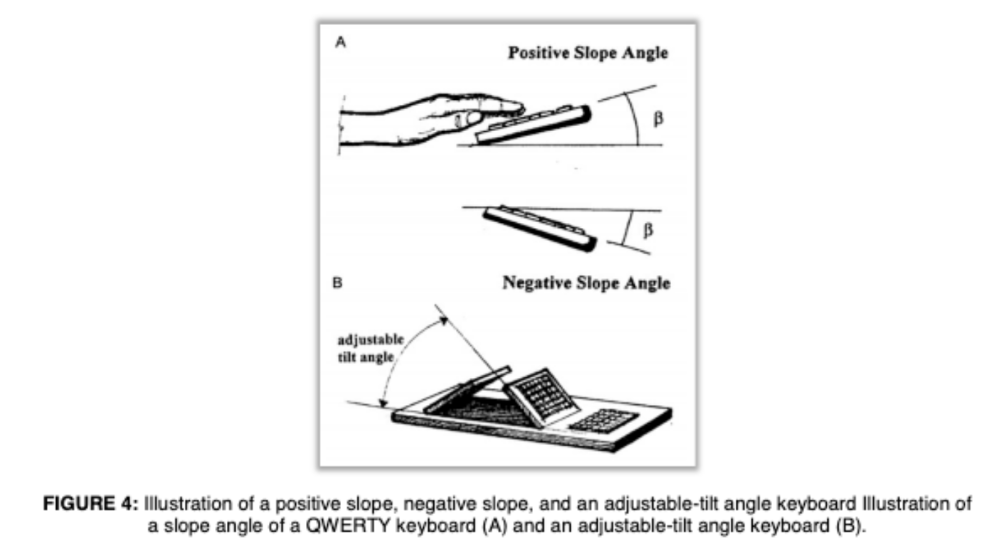
Like a lot of the papers surrounding ergonomics, this paper gives a firm nod to the idea that ergonomics isn’t just one thing. The paper treats several different physical variables independently:
- split/slant angle
- slope
- tenting/tilt
- key spacing
- palm support
- comfort
- productivity/learning curve
- accommodating different users
Ergonomics isn't one magic keyboard feature. It's a collection of little decisions about how a keyboard asks your body to move.
Meet Trinity: The research-paper keyboard
What was Trinity actually trying to accomplish?
- Encourage neutral posture
- Avoid negatively affecting typing speed and accuracy
- Avoid the bulky appearance associated with some ergonomic keyboards
In other words, Trinity wasn't intended to be ergonomic at the expense of everything else. The researchers wanted a keyboard that could accommodate the body while still being usable, productive, and reasonably approachable.
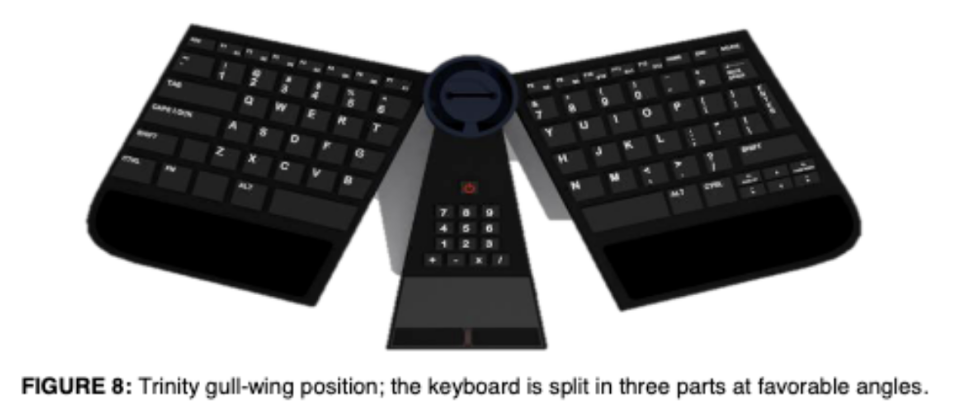
Trinity’s ergo recipe:
- 12.5° slant → intended to bring the wrists closer to neutral in the radial/ulnar direction
- Shoulder-width separation → intended to accommodate the user's natural arm position
- −7.5° slope → intended to bring wrist flexion/extension closer to neutral
- 20–30° tilt → intended to reduce forearm pronation
- 19 mm key spacing → based on research associated with usability and biomechanics
- Palm support → intended to reduce wrist extension/contact pressure
Now let’s put the Iris LM to the test
So what happens when we take that checklist and look at a modern split mechanical keyboard?
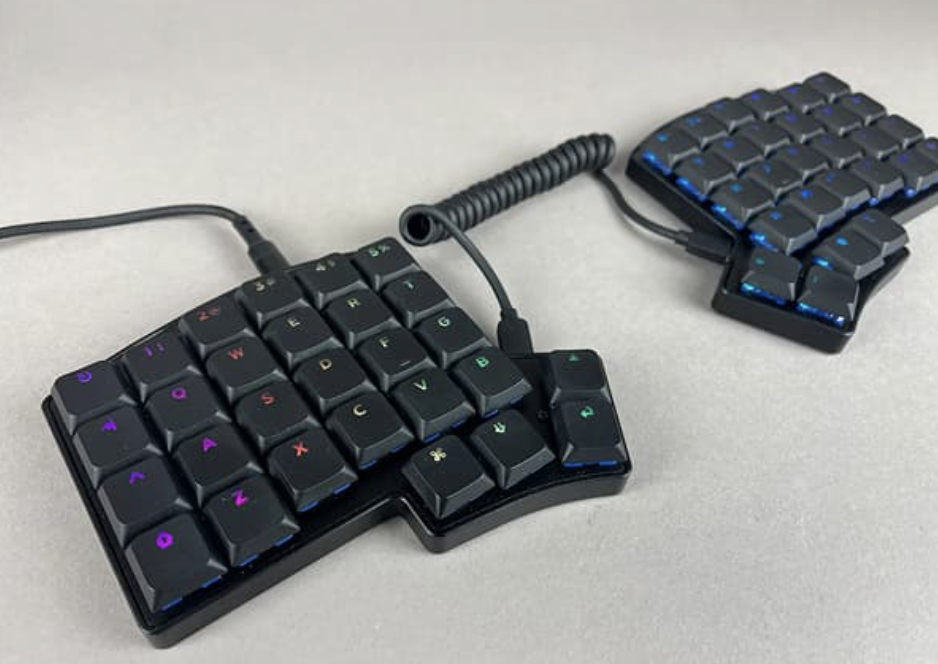
Enter: the Iris LM.
Split Design
The paper says splitting the keyboard allows the hands to move apart and helps address ulnar deviation. It cites research finding that a split/slant design can bring the wrists toward a more neutral position.
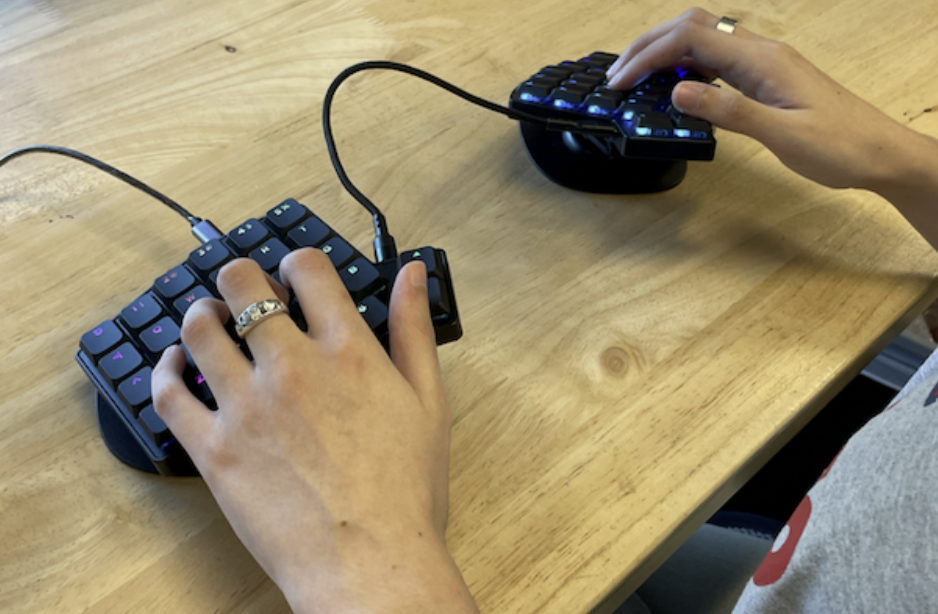
The Iris LM starts with the same fundamental idea: your hands don't have to live next to each other just because that's how a conventional keyboard happens to be shaped.
Tenting
The paper's Trinity design includes a tenting/tilt mechanism specifically because increasing the angle of each half can reduce forearm pronation. The authors ultimately chose 20° and 25° positions rather than 30° because the literature they reviewed found 30° uncomfortable for participants.
Trinity's designers didn't want to simply make a split keyboard. They wanted to let the keyboard change orientation in three dimensions.
And that's where things get especially familiar to anyone who has spent time with an Iris LM and a tenting setup.
Iris LM and Design Philosophy
We can't tell you that an Iris LM will prevent an injury, cure wrist pain, or magically make every ergonomic problem disappear. Bodies are annoyingly individual like that.
We can tell you that the Iris LM is a keyboard that changes some of the physical assumptions built into a conventional board: the halves can be separated, your hands don't have to crowd together, and with tenting you can experiment with the orientation of the keys themselves.
The goal isn't to prescribe one “correct” way to type. It's to give you more ways to make your tools fit you.
Our tenting stand kit and Iris LM don’t guarantee how you’ll feel: they just guarantee you’ll have more options than with a unibody keyboard that demands your hands stay in a single position.
Citation
The main paper discussed: A User-Centered Ergonomic Keyboard Design To Mitigate Work- Related Musculoskeletal Disorders in Computer Science Journals, 2020


Member discussion